
Design Search
Upload drawings of your product design and see which US design patents look closest.
Turnaround: usually within one hour; sometimes up to 24 hours. Pay per search, no subscription.
Who it is for
- Product designers and industrial designers about to file a design patent
- Consumer-goods and hardware startups checking a shape before tooling
- Furniture, packaging and accessory makers
- Amazon and e-commerce sellers with a custom product shape
- Anyone who wants to know what a design patent attorney would find in the first hour
What it does
You upload clear drawings or images of your design and a short description. Primoris shortlists US design patents by title keywords and design class, retrieves their drawings and compares them visually with yours. The closest designs get a deeper comparison that notes what an observer notices first, the shared features and the differences. Visual matching across the full drawing archive is being rolled out; today the always-on text and class shortlist feeds an AI visual comparison of the closest candidates.
Key capabilities
- US design patents 1976 to present, shortlisted by title keywords and design class
- AI visual comparison of your drawings with the drawings of the closest candidates
- Deep comparison of the closest designs: shared features, differences and an automated similarity score
- Similar products on the web, labelled unverified
- Candidates whose drawings could not be retrieved are listed as text-only, not hidden
How it works
- Create an account and open Design Search. You see the price, turnaround and limits before you pay.
- Upload 1 to 6 drawings or images and write a short description of the product.
- Pay for the search by card, or apply a voucher.
- Primoris works out the design class, shortlists design patents by title keywords and class, and retrieves their drawings.
- It compares the drawings visually with yours, and gives the closest designs a deeper comparison.
- Primoris verifies the citations against the source records and drops anything it cannot verify.
- Your report is ready usually within one hour, sometimes up to 24 hours. You get an email, and the report (web view and PDF) is in your account.
What we search
Each report also states, in its Search Scope and Limitations section, the date each source is current through. See Sources for all products.
| Source | What it covers | Data current through / refresh | Limits |
|---|---|---|---|
| US design patents | Design patents 1976 to present: titles, claims and design classes, shortlisted by text similarity | Loaded from USPTO releases; each report states the date it is current through | Look-alike designs filed under unrelated titles and classes can be missed |
| Design patent drawings | Drawings of the shortlisted designs, compared visually with yours; the closest get a deeper comparison | Fetched at search time from the Primoris drawing store and the USPTO | Visual matching across the full drawing archive is being rolled out. Only the closest candidates are compared visually; designs whose drawings cannot be retrieved are listed as text-only |
| Web check | Similar products on the web | Searched live on the report date | Labelled unverified. Not a complete search of products |
What you get
A report in three parts, as a web page in your account and a PDF you can download, with an email when it is ready.
Part A: Summary
One page, plain English
- Risk Factor Rating (High, Medium or Low) with a one-sentence meaning
- A verdict: how many designs were considered, how many were compared, what drives the rating
- Top matches table with automated similarity scores
- Points to discuss with an attorney
Part B: Technical detail
For attorneys and careful readers
- How we understood your design
- Closest prior designs: what an observer notices first, shared features, differences, per-design risk
- Similar products on the web (unverified)
- Assessment: what drives the rating and what would lower it
Part C: Appendix
Method, full tables, limits
- Full tables, including text-only candidates whose drawings were not compared
- Method and sources
- Search Scope and Limitations, with the data-currency date
- Disclaimer
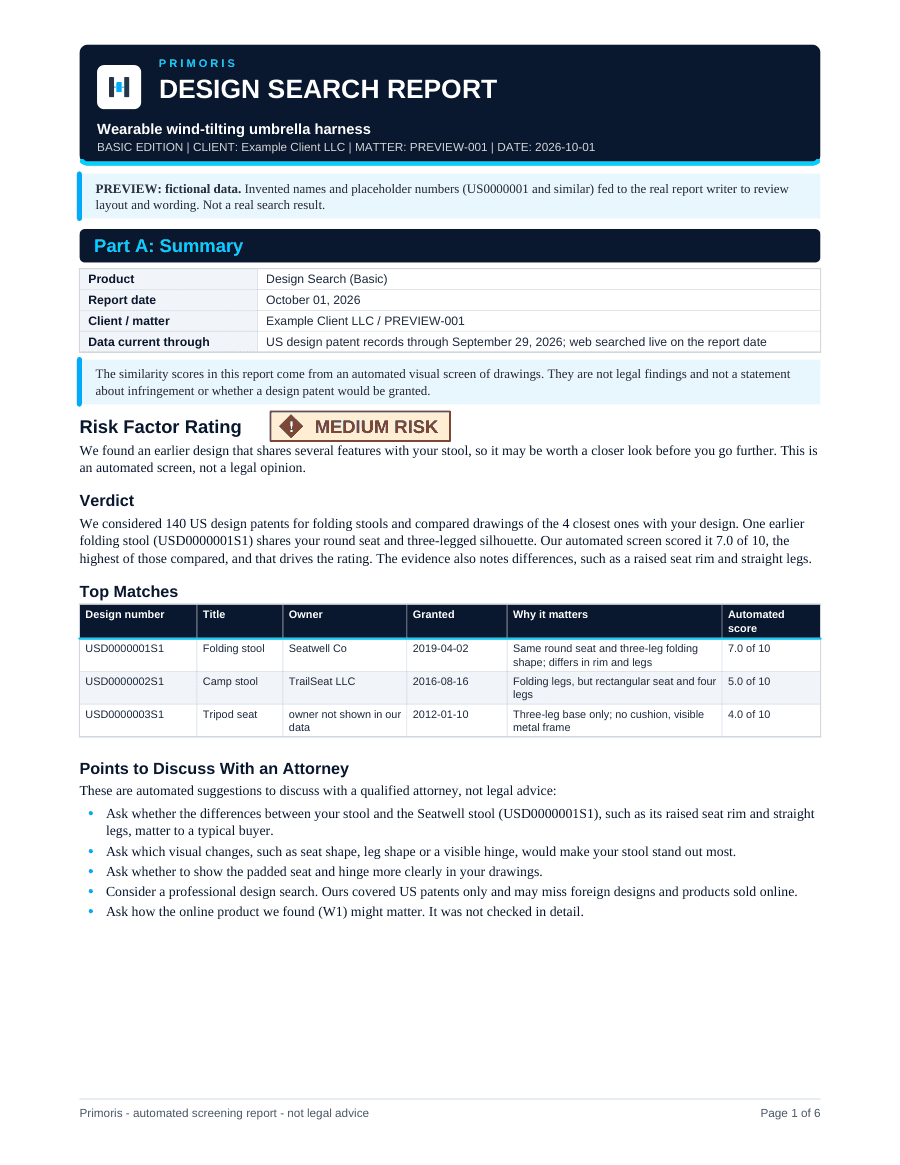
First page of a sample report
The data in samples is fictional. Real reports follow the same layout.
See all sample reportsWhat you provide
- Drawings or images
- One to six PNG, JPG or WEBP files, up to 10 MB each. Clean line drawings compare best.
- Description
- A short description of the product, up to 1,500 characters.
Uploaded files are deleted once the report is complete.
What it does not cover
- Foreign designs (EUIPO, Hague/WIPO, Japan, Korea, China)
- Products that are not shown in patent records or on the web
- Look-alike designs filed under unrelated titles and classes, and designs outside the closest candidates compared
- Legal findings. Similarity scores are automated visual-screen scores, not statements about infringement or whether a design patent would be granted
- Legal advice, or any guarantee that a design patent will be granted
Risk rating explained
Every report opens with a Risk Factor Rating. The words, not the colour, carry the meaning. The rating is a screening aid, not a legal finding.
- HIGH RISK
- An earlier design looks very close to yours overall. Worth a careful look with an attorney.
- MEDIUM RISK
- An earlier design shares several features with yours, with noticeable differences.
- LOW RISK
- No close design was found among the candidates compared. Designs filed under unrelated titles and classes can be missed.
Pricing and payment
$99.99 per search. You pay for each search you run.
- No subscription, no recurring charges and no prepaid credits. There are no upgrades between products.
- You need an account before you buy, and you see the price and the limits before you pay.
- Purchases are non-refundable once the search has started, including if you are unhappy with what the report found. If we fail to deliver a report, you are refunded in full.
- If you have a voucher, enter it at checkout.
See the Refund Policy, the Terms of Service and Pricing.
Frequently asked
- How does the visual comparison work?
- Your drawings are compared by AI with the drawings of the closest candidate design patents, which are shortlisted by title keywords and design class. The closest few get a deeper comparison that lists shared features and differences. Visual matching across the full drawing archive is being rolled out.
- What is the similarity score?
- An automated visual-screen score for ranking. It is not a legal finding and not a statement about infringement or whether a design patent would be granted.
- What should my drawings look like?
- Clean, well-lit images or line drawings that show the shape from one or more angles. Up to six PNG, JPG or WEBP files, 10 MB each. Blurry or cluttered images compare less well.
- Are foreign designs covered?
- No. Only US design patents are searched. EUIPO, Hague/WIPO, Japanese, Korean and Chinese designs are not.
- Can a similar design be missed?
- Yes. A look-alike filed under an unrelated title and class can fall outside the shortlist. Each report says how many designs were considered and how many were compared.
More answers on the FAQ page.
Related products
Patent Search (Basic)
$99.99per search
Upload your invention description and get a prior-art screening report with verified citations.
Learn more about Patent Search (Basic)
Available nowTrademark Search (Basic)
$99.99per search
Screen a name against US federal trademark records, including similar spelling and sound.
Learn more about Trademark Search (Basic)
Available nowBeer Search
$49.99per search
Check a beer name against trademark and label records, its label against federal rules, and state requirements, in one report.
Learn more about Beer Search
Ready to run Design Search?
Create an account, enter your details and get your report, usually within one hour.
Primoris reports are automated screening reports. They are not legal advice and not an attorney opinion, and no attorney-client relationship is created. A gap in the results does not prove that nothing exists. Talk to a registered patent or trademark attorney before filing or relying on a report.